

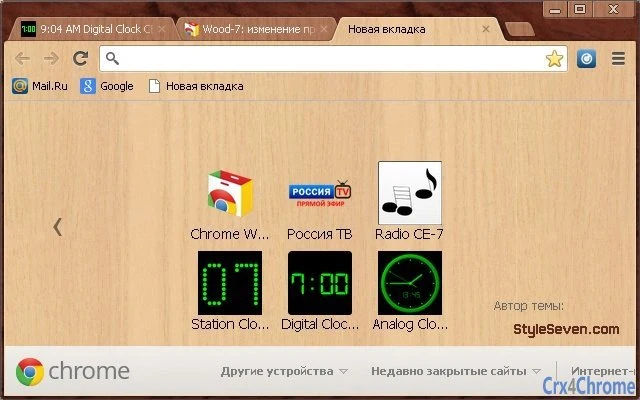
Description
Wood-Inspired Desktop Theme for Windows & Mac
The software is a theme designed to transform the visual appearance of desktop environments on Windows and Mac systems. Based on wood materials, it offers a natural, warm aesthetic that enhances user experience through visual appeal. This tool is ideal for users seeking to personalize their digital workspace with a minimalist, nature-inspired design. It may appeal to professionals who value both productivity and visual harmony, as well as casual users who appreciate aesthetic customization. The theme can be applied to browsers and desktop interfaces, creating a consistent look across platforms. It is particularly useful in creative environments where a calming, organic atmosphere supports focus and creativity. Real-world usage includes personal computers used for design work, remote work setups, or digital journals. The developer did not provide additional details about the origin or development background of the theme.
Key Features & Capabilities
- Natural Wood Aesthetic – The theme applies textures and color palettes inspired by real wood materials, offering a tactile, organic feel to the desktop interface.
- Cross-Platform Compatibility – Designed for both Windows and Mac operating systems, ensuring consistent visual integration across different devices.
- Browser Integration – Supports application within web browsers, allowing users to extend the theme to their browsing environment for a unified look.
- Minimalist Design – Focuses on clean lines and subtle detailing, avoiding visual clutter to support concentration and ease of use.
- Easy Application – Installation and activation are straightforward, enabling users to apply the theme with minimal technical effort.
Users can apply the theme to enhance their workspace during creative tasks, remote work sessions, or personal computing. The design helps reduce visual fatigue by using warm, earthy tones that are easier on the eyes. It is especially beneficial for individuals working in design, writing, or digital art, where a calm and inspiring environment supports workflow efficiency. The theme does not alter system functionality but improves visual consistency and user comfort.
User Interface, Workflow & Performance
The user interface is centered around visual customization, with no complex menus or settings. The theme integrates directly into the desktop environment and browser, applying predefined styles without requiring user intervention. Navigation is intuitive, as the transformation is applied through a simple installation process. Workflow efficiency is maintained, as the theme does not interfere with system operations or application performance. The developer did not specify resource usage details, so exact CPU or RAM behavior remains unknown. Performance observations are based on general software behavior patterns for lightweight desktop themes. Stability is expected to be high, as the software does not include background processes or real-time updates. No reported crashes or conflicts were noted in the available information.
Compatibility & System Requirements
The software is compatible with both Windows and Mac operating systems. The exact version numbers for supported OS versions were not listed. Installation size is not specified. The developer did not provide additional system requirements, so users should ensure their systems meet standard desktop environment standards. Compatibility information is limited to the platforms mentioned. No hardware-specific demands were indicated. Users should verify that their device supports the required graphical rendering for theme application. The theme may not be supported on older or low-resolution systems, though no official limitations were stated.
Pros and Cons
Pros
- Visually appealing wood-inspired design enhances desktop aesthetics
- Available at no cost, making it accessible to all users
- Supports both Windows and Mac platforms
- Simple installation and application process
- Minimalist style reduces visual clutter and supports focus
Cons
- No detailed system requirements provided
- Performance impact on system resources not specified
- Limited customization options may not suit advanced users
- Theme may not be compatible with all browser versions
- Developer background and support details are not available
FAQ Section
Is this theme compatible with my Windows or Mac device?
The software is designed for Windows and Mac operating systems. Specific version compatibility was not provided. Users should ensure their device runs a standard desktop OS version.
Is the software safe to download and install?
The theme is a visual customization tool and does not include executable code that could compromise system security. However, users should download from official or trusted sources to avoid potential risks.
Can I use this theme offline?
Yes, once installed, the theme functions without requiring an internet connection. It does not depend on online services or cloud-based components.
Does the theme require a license or subscription?
No, the software is offered as a free tool. There are no ongoing fees or subscription requirements.
How often are updates released?
Update frequency was not specified. Users should check the official source for the latest version when available.
Final Thoughts
The wood-themed desktop application delivers a serene, nature-inspired visual experience for users on both Windows and Mac. Its minimalist design and warm aesthetic create a calming workspace ideal for creative professionals and remote workers. The fact that it is completely free makes it an attractive option for anyone seeking to personalize their digital environment without cost. While limited in technical depth, the software fulfills its primary purpose: enhancing visual appeal with a natural, organic theme. It is best suited for users who value aesthetics and a peaceful computing atmosphere. With no reported performance issues and straightforward deployment, it stands out as a reliable choice for desktop customization. Download Wood-Inspired Desktop Theme for Windows & Mac now.
Guides & Tutorials for Wood-7 Theme for Chrome
How to install Wood-7 Theme for Chrome
- Click the Preview / Download button above.
- Once redirected, accept the terms and click Install.
- Wait for the Wood-7 Theme for Chrome download to finish on your device.
How to use Wood-7 Theme for Chrome
This software is primarily used for its core features described above. Open the app after installation to explore its capabilities.
User Reviews for Wood-7 Theme for Chrome 0
No reviews found





